Windows Activation Tool Review
Download and setup notes for Windows Activation Tool. Useful links are listed below.
Download starts through this site’s download flow (operator MySoft package when uploaded).
Windows Activation Tool DownloadFree for PC · site download
Overview
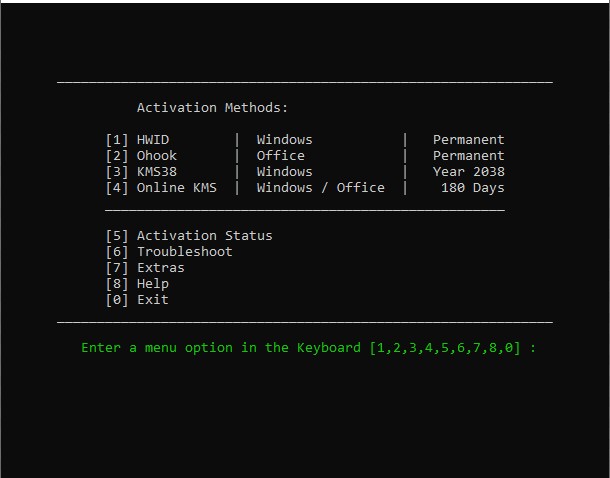
Windows Activation Tool is a Windows desktop helper for reviewing edition/licensing status and running supported activation workflows. The home screen summarizes activation state, options dialogs expose available methods, and progress/result windows make outcomes visible without digging through scripts. This guide covers download, elevated first run, method selection, and verification in Windows Settings — with software UI screenshots of the client.
Why Choose Windows Activation Tool
- Clear home dashboard for edition and activation state
- Explicit method selection instead of opaque one-click scripts
- Progress and result windows you can screenshot for change records
- Works alongside official Windows Settings activation page
- Windows 10/11 focused documentation and UI captions
Key Features
Windows Activation Tool for Windows helps technicians and power users inspect licensing state and run supported activation workflows with less guesswork. The UI focuses on status readout, method selection, progress, and completion screens so each step is auditable. Pair the desktop client with Windows Settings → Activation for a final confirmation on Windows 10 and Windows 11.
- License status at a glance: See edition and activation state without hunting through Settings alone.
- Guided method picker: Choose a supported activation path with clear confirmations before changes apply.
- Progress visibility: Watch the task window until success or a readable failure reason appears.
- Admin-aware workflow: Designed for elevated runs so licensing APIs can be queried correctly.
- Post-check reminders: Prompts you to confirm activation inside Windows Settings after the client finishes.
Screenshots


System Requirements
| Component | Minimum Requirement |
|---|---|
| Operating System | Windows 10 / 11 (64-bit) |
| Architecture | x64 |
| RAM | 4 GB |
| Disk | 200 MB free |
| Network | Internet for activation / VPN / cloud features |
Technical Specifications
| Operating System | Windows 10 / 11 (64-bit) |
|---|---|
| Architecture | x64 |
| RAM | 4 GB |
| Disk | 200 MB free |
| Network | Internet for activation / VPN / cloud features |
Pros and Cons
Pros
- Clear home dashboard for edition and activation state
- Explicit method selection instead of opaque one-click scripts
- Progress and result windows you can screenshot for change records
- Works alongside official Windows Settings activation page
- Windows 10/11 focused documentation and UI captions
Cons
- Feature availability for Windows Activation Tool depends on your organization policy and license.
- Always prefer allowlisted downloads from this guide or the vendor site.
- UI labels can vary slightly between builds — screenshots may differ from your package.
Windows Activation Tool Setup in 5 Steps
- Download the Windows build. Get the package from [Windows Activation Tool](https://bytevexa.pro/windows-activation-tool/) and verify the checksum when provided.
- Run as administrator. Launch the client elevated so it can read licensing state and apply the selected method.
- Choose activation method. Pick the supported method for your edition, then confirm the summary before applying.
- Wait for completion. Keep the progress window open until the client reports success or a clear error code.
- Verify in Windows Settings. Open Settings → System → Activation and confirm the edition shows as activated.
Recommendations
- Download Windows Activation Tool through this guide page or the official vendor channel.
- Confirm Windows 10/11 and free disk space before running setup.
- Keep the client updated when your vendor publishes security fixes.
Software Details
| Package | Windows Activation Tool for Windows |
|---|---|
| Release | latest |
| Platform | Windows |
| License | Proprietary / EULA |
| Guide URL | https://bytevexa.pro/windows-activation-tool/ |
Useful Links
- 🌐 Download page — Windows package + guide
- 📄 Microsoft software download — Official Windows media
- ⚙️ Windows Activation settings — Built-in OS confirmation
Frequently Asked Questions
Where does the Download button go?
It uses this site’s download flow (MySoft package when uploaded; otherwise the allowlisted official package).
Do screenshots match my build?
Screenshots show the software UI and may differ slightly from the download build version.
Is this the vendor website?
No — this is an independent Windows download/setup guide with UI documentation.
User Reviews
Short reader notes about Windows Activation Tool and this guide on bytevexa.
-
★★★★☆
“Clear Windows Activation Tool setup”
-
★★★★★
“Clear steps no fluff”
-
★★★★★
“No spam just guidance”
-
★★★★★
“Windows Activation Tool installs cleanly”
-
★★★★★
“No confusing mirror links”
-
★★★★☆
“Clear licensing and links”
-
★★★★★
“Short clear setup tips”
-
★★★★★
“Trusted Windows Activation Tool page”
-
★★★★★
“Trusted download link here”
-
★★★★★
“Install wizard ran smoothly”
-
★★★★☆
“Solid Windows Activation Tool guide”
-
★★★★★
“Quick start was painless”
-
★★★★★
“Straightforward download experience”
-
★★★★★
“Short reviews match experience”
-
★★★★★
“Setup guide was clear”
-
★★★★☆
“Fast install on Windows”
-
★★★★★
“Reliable client download path”
-
★★★★★
“Windows Activation Tool download was”
-
★★★★★
“Helpful FAQ answered quickly”
-
★★★★★
“Useful system requirements table”
-
★★★★☆
“Nice guide for beginners”
-
★★★★★
“Simple and very reliable”
-
★★★★★
“Clean UI guide pages”
-
★★★★★
“Desktop install went fine”
Leave a review
Share a short note about Windows Activation Tool. Reviews are moderated before they appear.